

🧠 Knowledge signals from chat
Updated in August 2026 — Knowledge Signals from Chat now includes automatic mid-chat capture. See the August 2026 Product Update for what’s new.
- Open any conversation in your domain
- Click the brain icon (Knowledge Suggestions) in the chat controls bar
- Review the suggested entries; each one is editable before accepting
- Accept, Decline, or edit inline, then accept. Nothing is published automatically
FAQs
FAQs
Does accepting a suggestion take effect immediately?
Does accepting a suggestion take effect immediately?
Yes. Once accepted, the entry is written to the domain knowledge base and available for retrieval on the next query.
What if I accept something that's wrong?
What if I accept something that's wrong?
Navigate to the Domain Knowledge tab. The confirmation notification after acceptance includes a direct link. You can edit or delete the entry there.
The Knowledge Suggestions panel is currently in early access while we refine its performance and quality. Review and edit suggestions before accepting.
Currently available to Domain Admins only. This feature will extend to Explorers in a future release.
🗂️ Agent version control
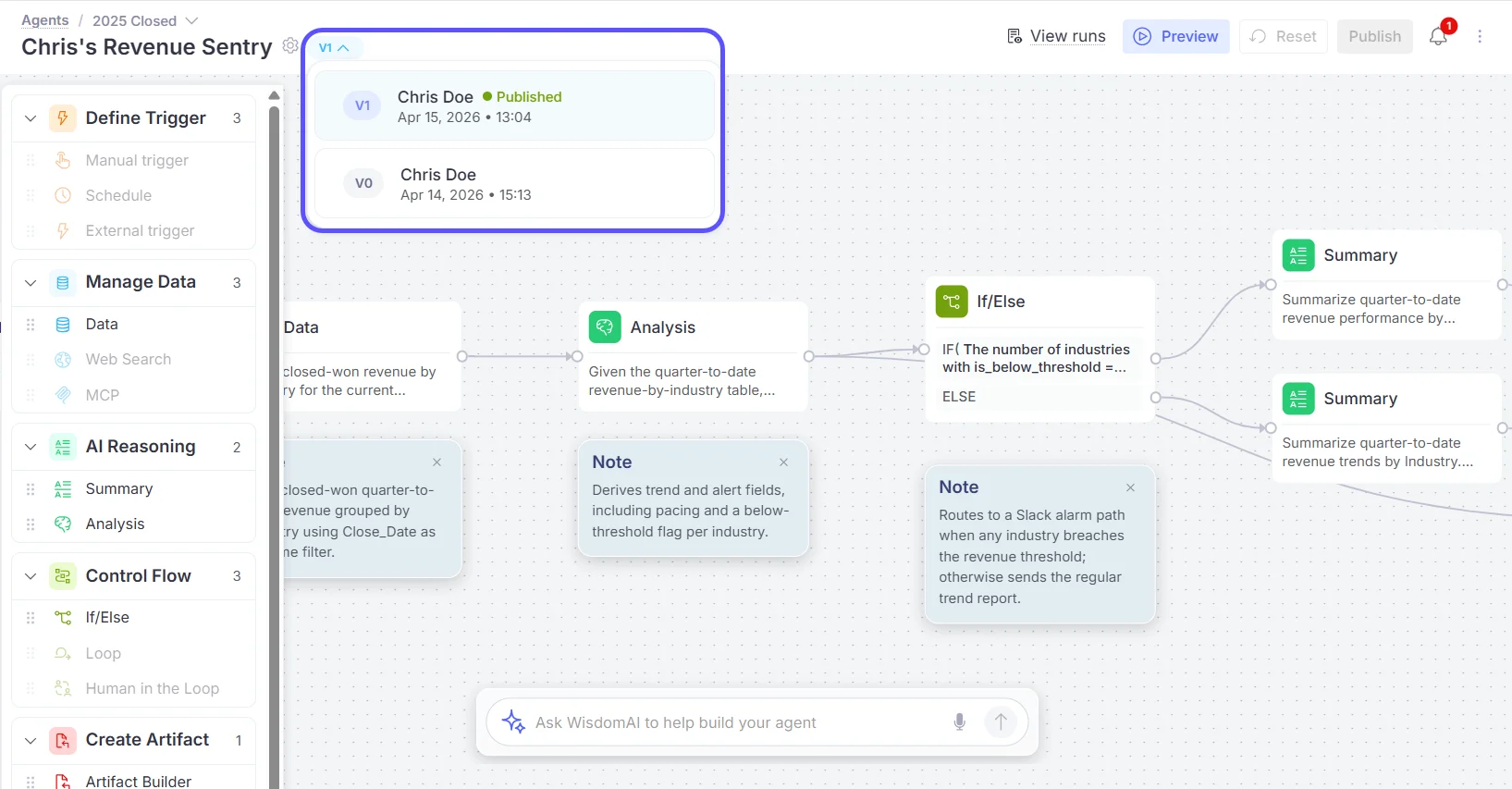
Agent edits no longer modify the live version. Every change creates a draft, leaving the published version running undisturbed until you’re ready. Publishing a new version increments the version number and locks that version. Run logs are permanently tied to the version that executed them, so reviewing a past run always shows the correct graph and configuration.⚙️ How it works:- Edit the agent. A draft is created automatically, and the published version continues running
- Test using Preview before committing any changes
- Click Publish. The draft is locked as the new published version, and the version number increments
- Open any past run in the Run Visualizer to see the exact version used for that run
FAQs
FAQs
Does publishing affect runs currently in progress?
Does publishing affect runs currently in progress?
No. In-progress runs complete against the version they were dispatched on. Publishing only affects runs triggered after the publish.
Can I roll back to a previous published version?
Can I roll back to a previous published version?
Version history is retained and viewable. One-click rollback is on the near-term roadmap.
Can multiple people edit the same agent simultaneously?
Can multiple people edit the same agent simultaneously?
Each agent has one draft at a time. Concurrent edit locking is on the roadmap.
✅ Agent Reviewed runs
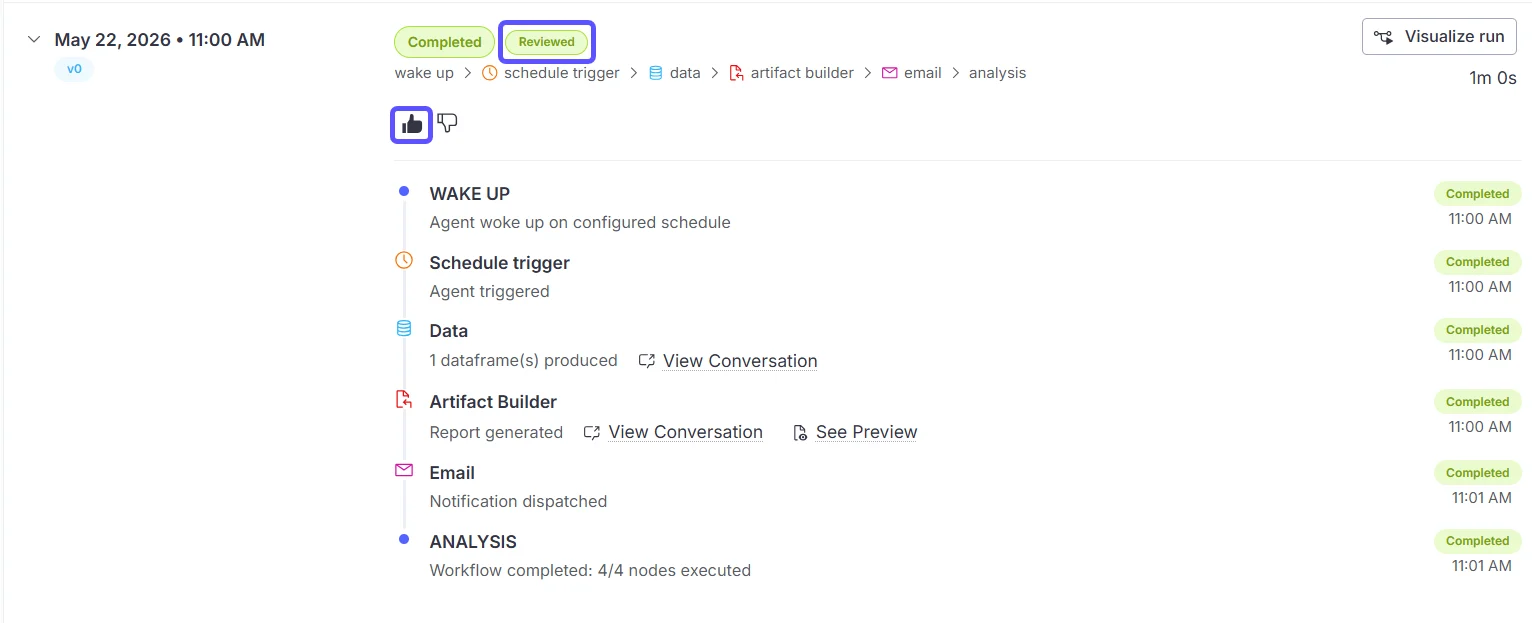
Reduce agent non-determinism by marking successful runs as golden examples. When a run is marked as Reviewed, its full execution history (LLM interactions, tool calls, and outputs) is injected into future runs of the same prompt as historical context. This anchors SQL patterns, output formatting, and decision logic to a run you’ve confirmed is correct.⚙️ How it works:- Open an agent and click View Runs to access its Previous Runs
- Click Mark as reviewed on a successful run, a green Reviewed chip appears on the run header
- On future runs, WisdomAI fetches up to 3 matching reviewed conversations and injects them as context before generating a response
FAQs
FAQs
How many reviewed runs does the system use at once?
How many reviewed runs does the system use at once?
Up to 3, selected by most-recently-reviewed first.
Can I un-review a run?
Can I un-review a run?
Yes. The action can be toggled. Removing reviewed status removes the run from the reference pool immediately.
🔍 Agent Run visualizer
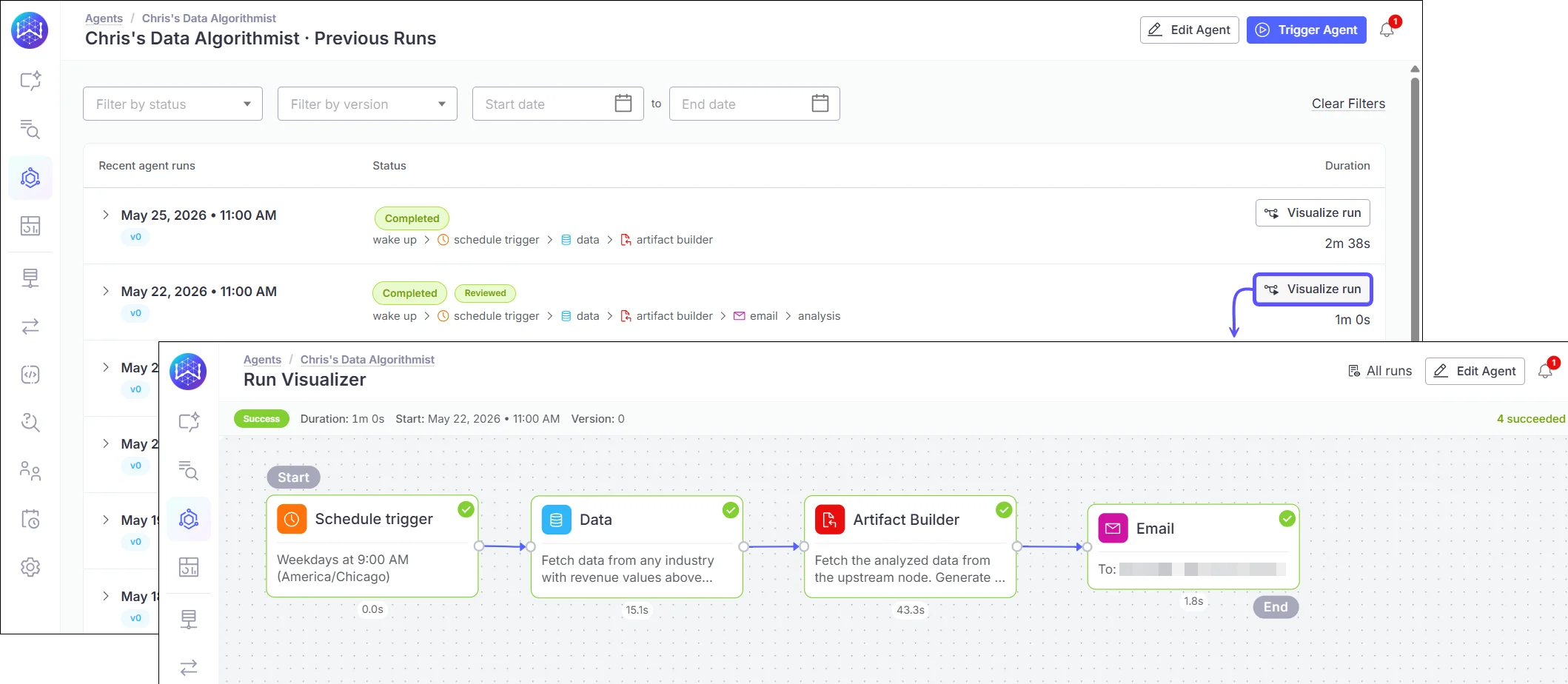
The Run Visualizer renders a full execution trace of any past or live agent run directly on the agent graph: every node color-coded by status, with a detail panel showing inputs, outputs, tool calls, and timing. Because the graph displayed is always the version used for that specific run, it serves as a reliable audit trail even after the agent has been updated.⚙️ How it works:- Go to Agents, open an agent, and navigate to Previous Runs
- Click any run to open its Run Visualizer
- Click any node to see its input, output, tool calls, and execution duration
- For live runs, nodes update in real time as the execution progresses
FAQs
FAQs
Does the visualizer show the current agent version or the version that ran?
Does the visualizer show the current agent version or the version that ran?
Always the version used for that run. If the agent has been edited and republished since, historical runs still show the original version.
Does this work for both Visual Mode and Prompt Mode agents?
Does this work for both Visual Mode and Prompt Mode agents?
Yes. Visual Mode agents show the full node graph. Prompt Mode agents show a structured timeline of LLM calls, tool invocations, and outputs.
🔌 Dremio connector
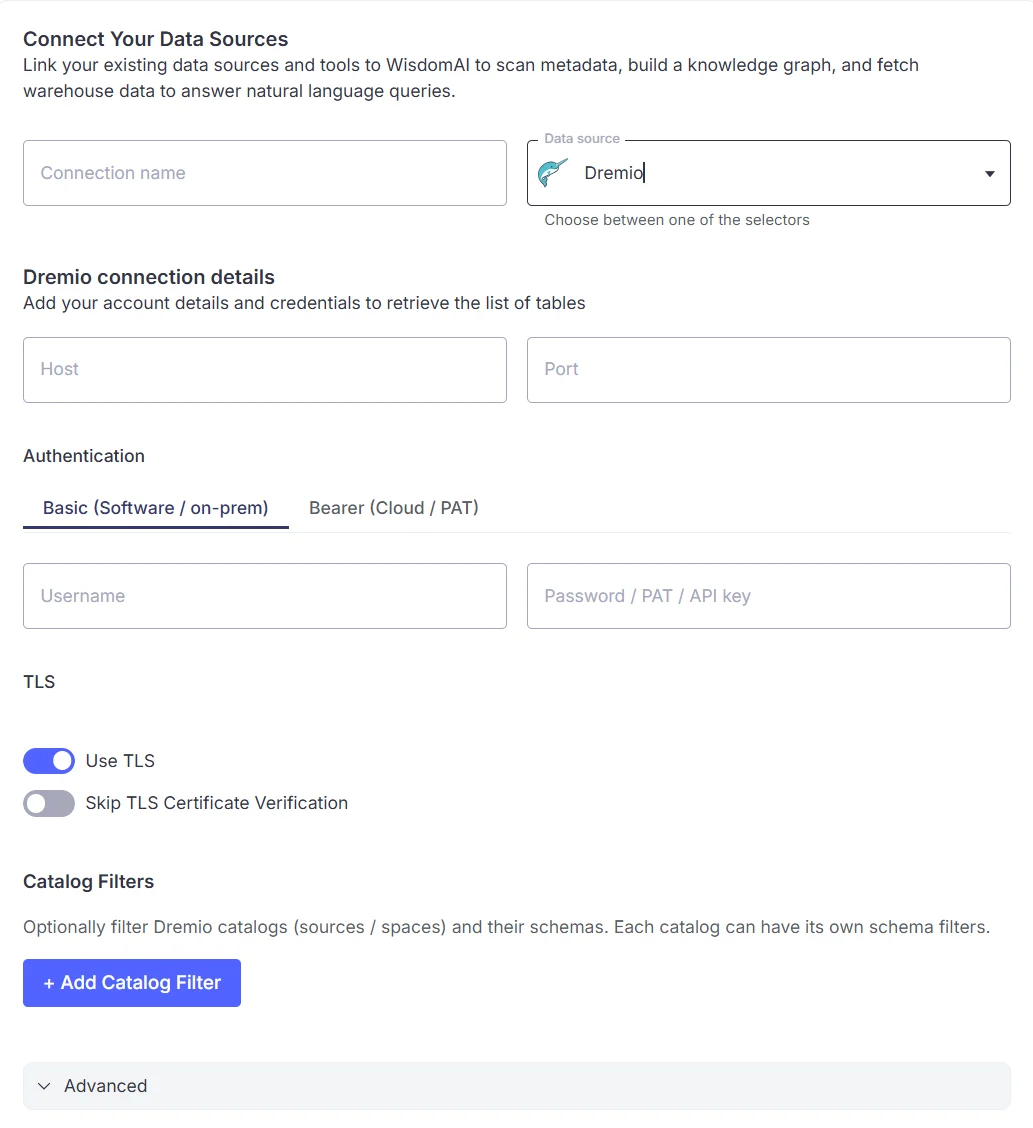
WisdomAI now connects natively to Dremio Cloud and Dremio Software via Apache Arrow Flight, enabling natural-language queries against your data lakehouse without manual dialect configuration or JDBC workarounds. WisdomAI handles schema crawling, view detection, and Dremio-specific SQL generation are handled automatically. Enterprise deployments using internal CA certificates are supported via custom certificate upload during setup.⚙️ How it works:- Go to Connections > Add connection and select Dremio
- Enter the Flight endpoint host and port
- Provide authentication credentials: Personal Access Token for Dremio Cloud; username/password or PAT for Dremio Software
- Configure TLS and optionally upload a custom root certificate for internal CA environments
- WisdomAI crawls the schema and makes the domain available for natural-language queries
- Define the source path scope (Dremio’s multi-level namespace paths are supported)
FAQs
FAQs
Are both Dremio Cloud and Dremio Software supported?
Are both Dremio Cloud and Dremio Software supported?
Yes. Dremio Cloud uses a Personal Access Token. Dremio Software supports username/password via Flight handshake or a PAT.
What SQL dialect does WisdomAI generate for Dremio?
What SQL dialect does WisdomAI generate for Dremio?
WisdomAI automatically generates SQL in Dremio’s dialect. No manual configuration is required.
Is there a row limit on queries executed against Dremio?
Is there a row limit on queries executed against Dremio?
WisdomAI applies its standard query result limits. Dremio’s own resource controls also apply.
📊 Dashboard improvements
Three updates make editing, exporting, and working with dashboard tiles faster and more reliable.- Inline tile renaming: Rename a dashboard tile by hovering over the title and clicking to edit it directly, without navigating through the overflow menu. Viewers see a plain title with no edit option, keeping the interface clean for non-editors.
- Tile export and copy: Exporting and copying dashboard tiles now includes a reorganized menu, live progress tracking for CSV exports, and image exports that exclude UI chrome.
- SQL widget trajectory: The Add SQL Tile flow now creates a trajectory at widget creation time, matching the behavior of chat-created widgets. All dashboard widgets now carry trajectory lineage, supporting trajectory-based editing going forward.