

How it works
The process is designed to be seamless and keyboard-friendly, ensuring you stay in your creative flow.Start Typing
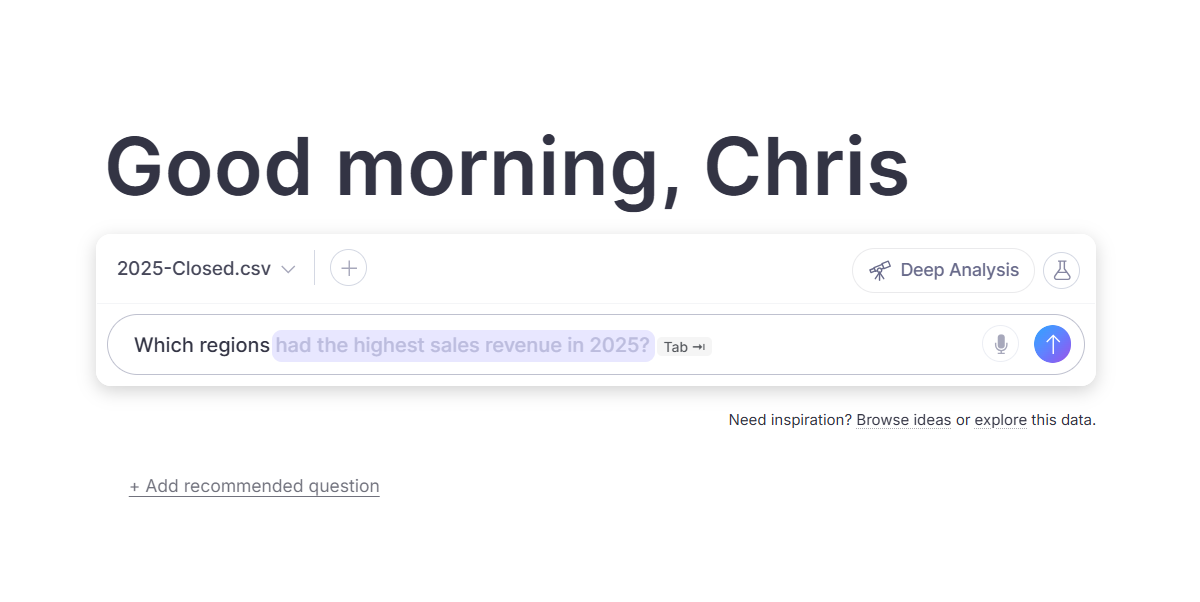
Begin entering your question or command in the chat input box. The system begins analyzing your input immediately to predict the most relevant completion.
See Suggestions Appear
Helpful completions appear automatically as gray ghost text. These suggestions are tailored to the specific data, metrics, and terminology defined within your current Domain.
Key capabilities
Ghost Text Completion provides several benefits for both new and experienced users:- Faster Input: Write complex questions with fewer keystrokes.
- Domain Discovery: Identify specific terms, metrics, and data patterns unique to your organization.
- Consistent Querying: Reuse common styles and phrasing effortlessly.
- Keyboard-First Workflow: Maintain focus on your question without needing to use a mouse or navigate menus.
Designed for
Text completion is key for:- Explorers who are learning what questions they can ask of their data.
- Builders who write complex or technical queries.
- Operators who want faster access to insights.
- Power Users who value speed and keyboard-first workflows.
FAQs
Do I have to use the suggestions?
Do I have to use the suggestions?
No. Suggestions are entirely optional and are designed to stay out of your way if you choose to ignore them.
Are the suggestions relevant to my data?
Are the suggestions relevant to my data?
Yes. The completions are specifically generated based on the context of the Domain you are currently using.
Does this slow down the typing experience?
Does this slow down the typing experience?
No. The system is optimized to show suggestions quickly and update them seamlessly as you continue to type.
Does this provide user-level personalization?
Does this provide user-level personalization?
Not currently. This feature focuses on Domain-specific terminology and common patterns. Individual user personalization is planned for a future update.
Next steps
Ask Better Questions
Learn strategies for phrasing your queries to get the most accurate results.
Using File Attachments in Chat
Attach a file to your WisdomAI chat to provide additional context for the session.