
Documentation Index
Fetch the complete documentation index at: https://docs.wisdom.ai/llms.txt
Use this file to discover all available pages before exploring further.
🤖 Metrics & Derived Column Copilots
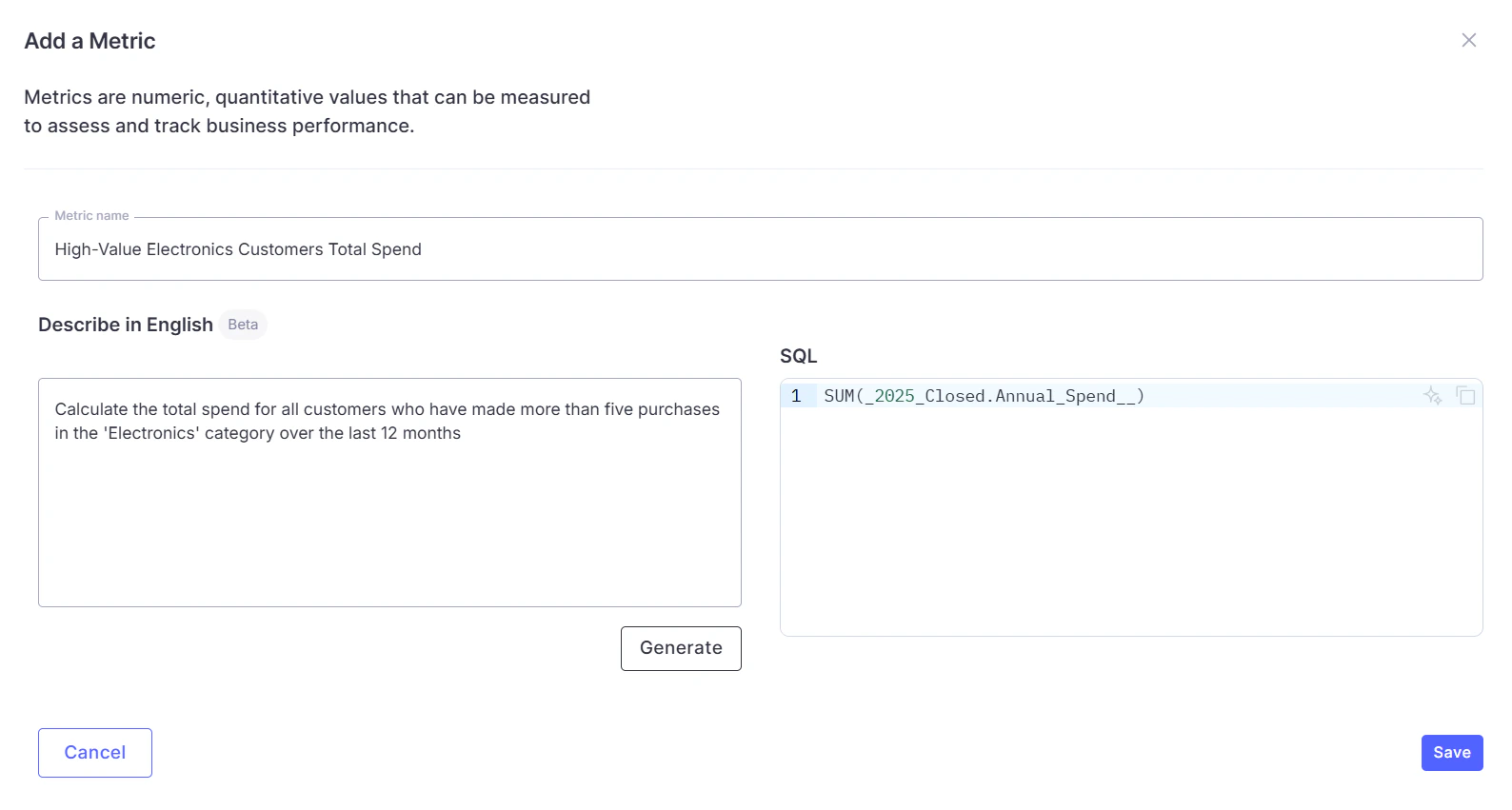
Defining business logic is now much easier with the AI-powered Metrics & Derived Column Copilot. Describe what you want in plain English, and WisdomAI generates the SQL, identifies the correct source table, and validates the expression against your warehouse before saving. The generated SQL is fully editable, allowing you to review and adjust it before adding it to your domain.⚙️ How it works:- Access Context > Metrics tab > Add Metric
- Describe a metric or derived column in natural language and select Generate
- WisdomAI classifies the request, identifies the source table, and generates the SQL
- The query is validated against your warehouse
- Review and edit before saving
FAQs
FAQs
What is the difference between a metric and a derived column?
What is the difference between a metric and a derived column?
Can I edit the generated SQL?
Can I edit the generated SQL?
📄 Tabular Extraction from Unstructured Datasets
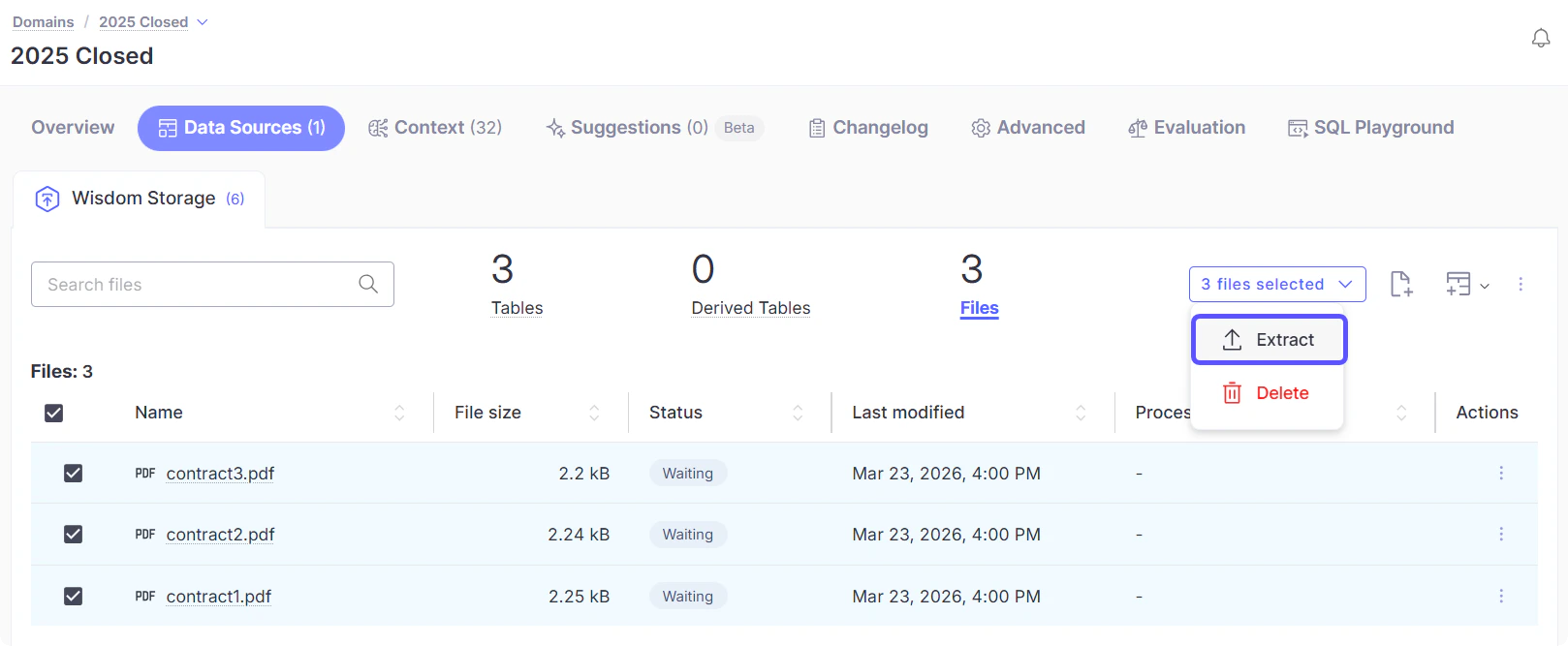
Turn unstructured files, such as PDF, Word, PowerPoint, plain text, Markdown, HTML, JSON, XML, YAML, and image formats into fully queryable tables. By defining fields with plain-English prompts, WisdomAI extracts values from multiple file formats and materializes them as structured data that can be queried, filtered, and joined with your existing datasets.⚙️ How it works:- Upload files to a dataset in a domain, go to Data Sources > Wisdom Storage
- Select the uploaded files and click Extract
- Wait for the status to change to Success, and a new structured table will appear in your domain
FAQs
FAQs
Can I query extracted data alongside my warehouse data?
Can I query extracted data alongside my warehouse data?
Can I update my field definitions after extraction?
Can I update my field definitions after extraction?
📊 Warehouse Observability
WisdomAI now provides visibility into how your warehouse is queried and how your team uses the platform. A system-generated domain, WisdomAI Usage Metrics, is automatically provisioned for every account.⚙️ How it works:A new system-generated domain is available to Admins in the domain list, featuring two pre-built dashboards:- Warehouse Usage Dashboard: Displays query-level details including execution time, rows returned, bytes scanned, and cache status.
- Usage Analytics Dashboard: Tracks team adoption via conversation counts, active users, questions asked, and feedback rates.
FAQs
FAQs
Where do I find the Warehouse Observability dashboard?
Where do I find the Warehouse Observability dashboard?
How often is the data updated?
How often is the data updated?
Is this domain visible to all users?
Is this domain visible to all users?
🔐 Login Method Memory
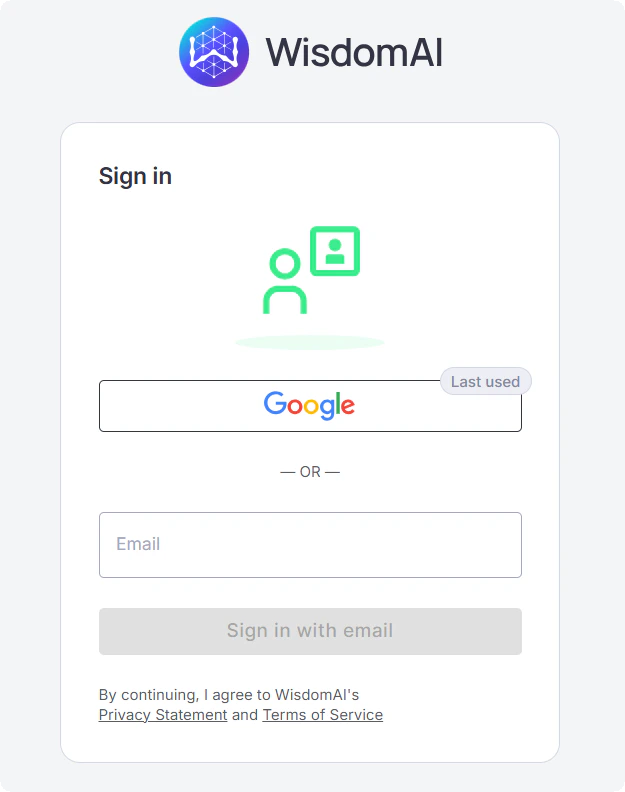
WisdomAI now remembers your last sign-in to streamline future logins. Your previous method, Google, SSO, or email, is highlighted with a “Last used” badge, and email addresses are pre-filled when applicable. This information is stored locally in your browser and is not sent to any server.⚙️ How it works:- Sign in using any available method
- WisdomAI stores the method locally in your browser
- On your next visit, the last method is highlighted with a “Last used” badge
FAQs
FAQs
Is my login information stored securely?
Is my login information stored securely?
Can I still sign in with a different method?
Can I still sign in with a different method?
🧠 Smarter Data Crawling
WisdomAI has improved its warehouse data crawling to populate filter dropdowns, autocomplete suggestions, and data exploration features by identifying columns that contain meaningful categorical values and prioritizing them during scheduled runs. Other columns are fetched on demand, reducing unnecessary queries and improving performance for large schemas.⚙️ How it works:- Scheduled crawls scan selected columns with named entities (customer names, status values)
- Adding a filter or enabling “lookup” triggers a targeted crawl for that column
- Values appear shortly after the crawl completes
FAQs
FAQs
What if a filter dropdown shows no values?
What if a filter dropdown shows no values?
Can I force a column to always be crawled?
Can I force a column to always be crawled?
🧩 Partition & View Awareness
WisdomAI now detects partition columns and distinguishes between base tables, views, and materialized views during schema crawling. This information is used to generate more efficient SQL queries with appropriate partition filters and optimized query strategies. This results in fewer query failures, faster performance on large datasets, and reduced warehouse costs.- Schema crawl identifies partition columns and table types
- Generated SQL includes partition filters to avoid full-table scans
- Query strategy adapts based on whether the table is a base table, view, or materialized view
- Background crawling prioritizes recent partitions to improve efficiency
FAQs
FAQs
Do I need to configure anything?
Do I need to configure anything?
How does this reduce BigQuery costs?
How does this reduce BigQuery costs?
🔌 Teradata Connector
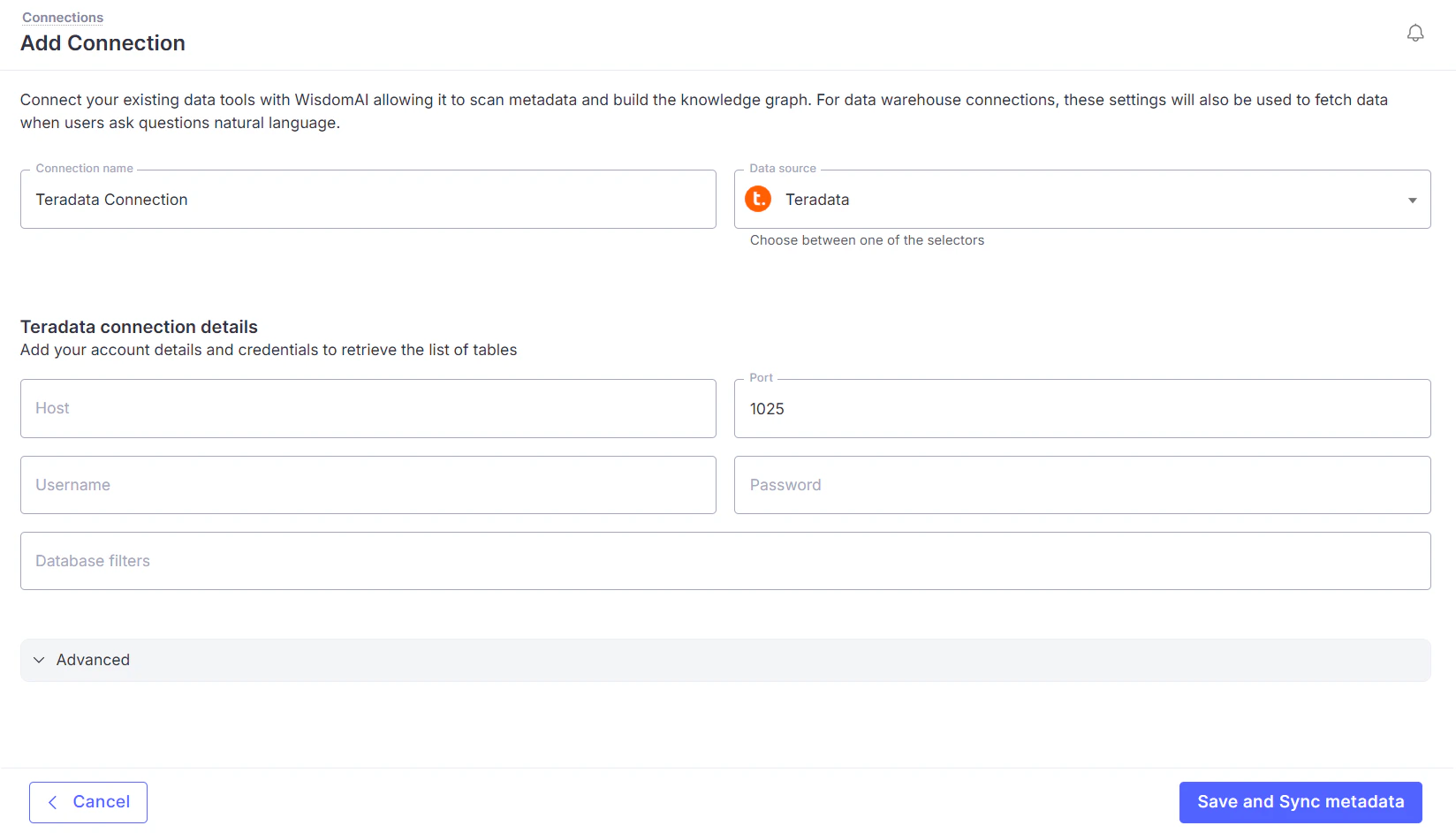
WisdomAI now connects natively to Teradata Vantage, enabling natural-language querying, AI-powered analytics, and interactive dashboards without requiring data replication. It automatically discovers schemas across databases and generates Teradata-specific SQL, while executing all queries in read-only mode to ensure data safety and compliance.⚙️ How it works:- Access Connections > Add connection and select Teradata
- Enter credentials and validate access
- Optionally limit access using database filters
- WisdomAI crawls the schema and enables querying
FAQs
FAQs
Which Teradata products are supported?
Which Teradata products are supported?
Can WisdomAI modify data in Teradata?
Can WisdomAI modify data in Teradata?
☁️ Google Cloud Spanner Support
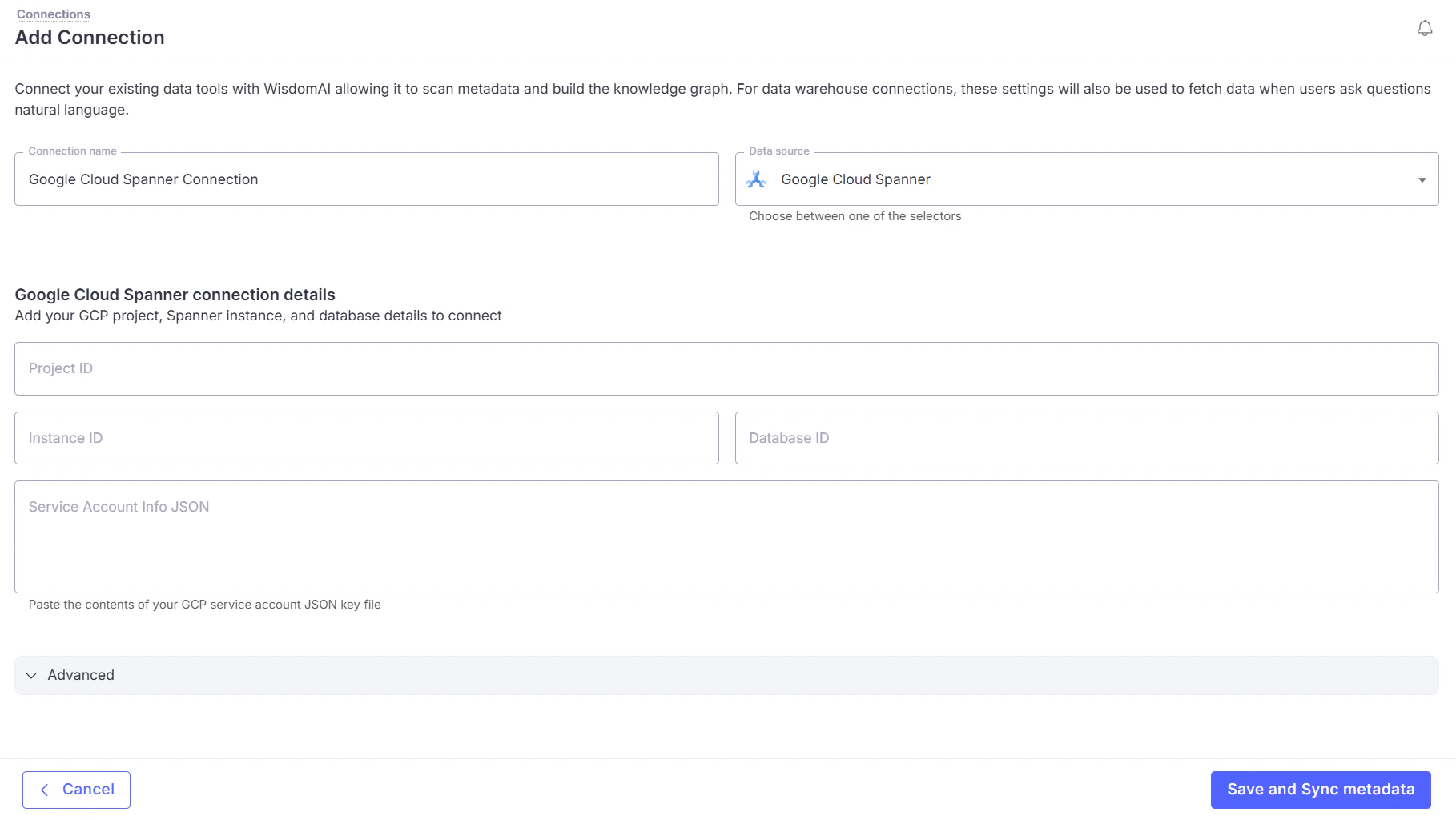
WisdomAI connects directly to Google Cloud Spanner, automatically detecting whether your database uses Google Standard SQL or PostgreSQL and handling both without additional configuration. It also performs full schema discovery and executes all queries in read-only mode for safety.⚙️ How it works:- Access Connections > Add connection and select Google Cloud Spanner
- Provide project details and Service Account credentials
- WisdomAI validates access, detects the SQL dialect, and crawls the schema
FAQs
FAQs
How does WisdomAI detect my Spanner SQL dialect?
How does WisdomAI detect my Spanner SQL dialect?
Can WisdomAI modify data in Spanner?
Can WisdomAI modify data in Spanner?
🔗 AI-Powered Join Suggestions
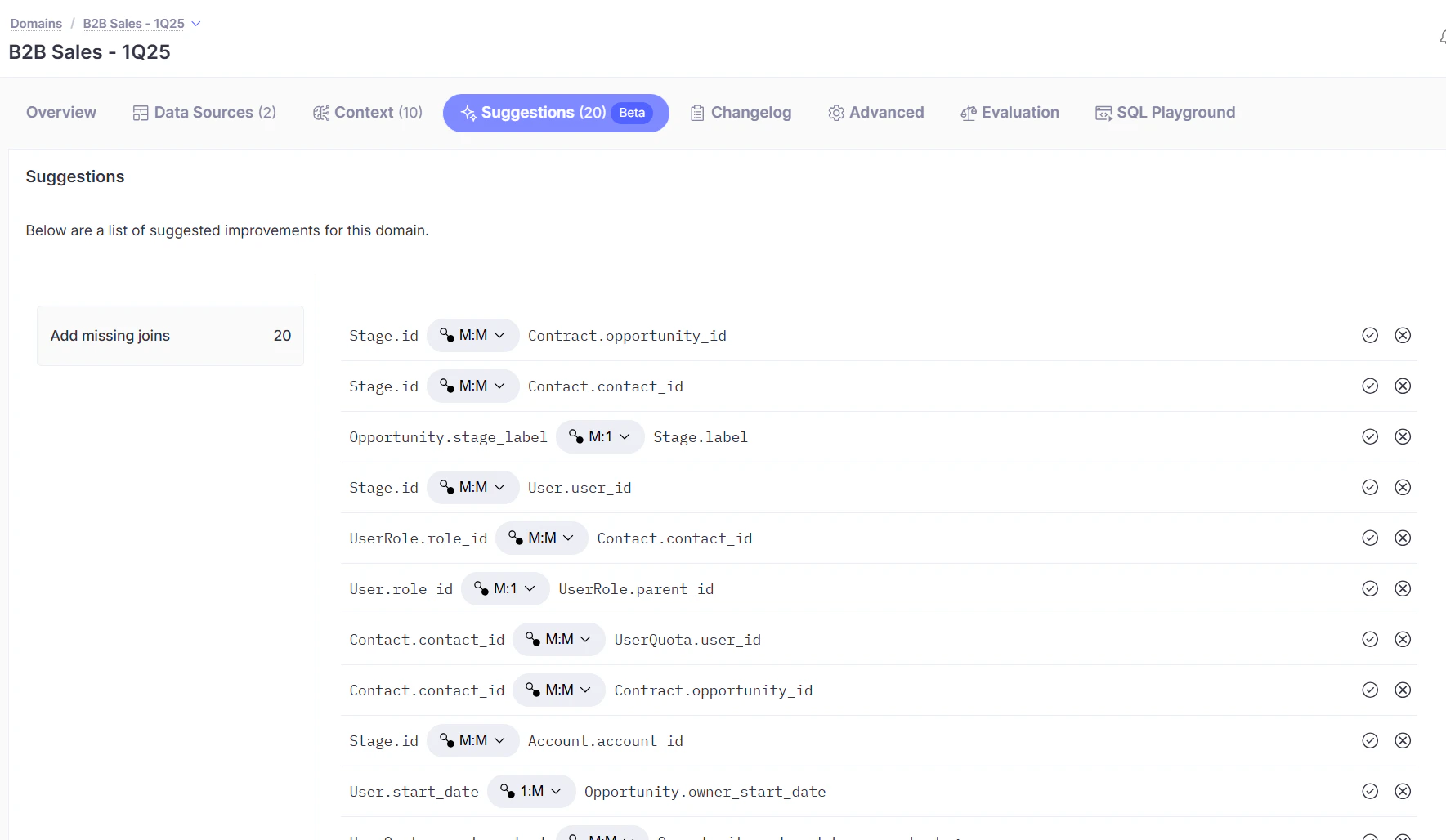
WisdomAI analyzes your schema to detect missing relationships between tables and validates them against actual data to ensure meaningful joins. These are surfaced as one-click suggestions that can be reviewed and applied to improve query accuracy.⚙️ How it works:- WisdomAI analyzes table schemas to identify potential foreign key relationships
- Candidate joins are validated using real data overlap
- Suggestions appear in the domain for review
- Accept or decline each join and define the relationship type
FAQs
FAQs
How does WisdomAI know which joins to suggest?
How does WisdomAI know which joins to suggest?
Why does this matter for query accuracy?
Why does this matter for query accuracy?
🔔 Notify when Completed
WisdomAI can now notify you when long-running queries finish, even if you switch tabs. After a few seconds, you can opt in to receive a browser alert, sound, and tab update when results are ready.⚙️ How it works:- After a few seconds, a “Notify me when complete” prompt appears
- Click it and grant browser notification permission if prompted
- Switch to any other tab or app and keep working
- When the response is ready, you’ll receive a browser notification, an audio chime, and a tab title update simultaneously
FAQs
FAQs
Do I need to install anything?
Do I need to install anything?
What if my browser blocks notifications?
What if my browser blocks notifications?
Will I be notified if I close the tab?
Will I be notified if I close the tab?
🌍 World Map Visualization
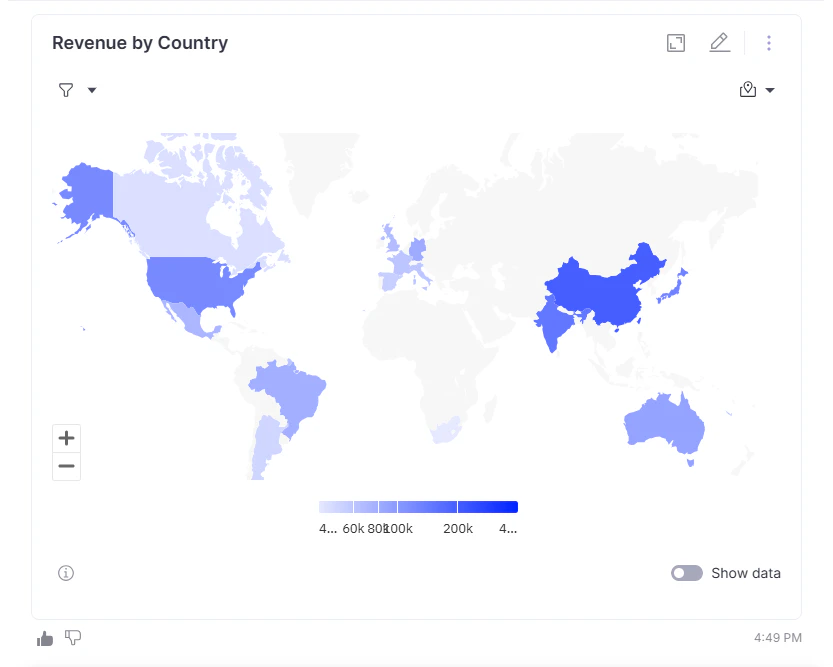
WisdomAI includes a choropleth world map visualization for country-level data, automatically detecting geographic dimensions and using color gradients to highlight differences in metric values. Tooltips provide exact figures for each country. Supports both country names and ISO country codes, and is available in chat and dashboards.⚙️ How it works:- Queries with country-level data automatically trigger a world map visualization suggestion
- Countries are colored based on metric values (darker = higher)
- Hovering over a country displays its name and exact metric value
FAQs
FAQs
What data does my query need to produce a world map?
What data does my query need to produce a world map?
Can I add a world map to a dashboard?
Can I add a world map to a dashboard?
💬 Slack Link Previews
Sharing a WisdomAI link in Slack now generates a rich preview that displays charts or data tables directly in the conversation, with no clicks or context-switching required.⚙️ How it works:- Paste a WisdomAI link in any Slack channel or DM
- Slack requests a preview from WisdomAI in the background
- WisdomAI verifies the poster’s identity and data access
- A rich preview appears inline below the message
FAQs
FAQs
Do I need to do anything to enable this?
Do I need to do anything to enable this?
Will everyone in the channel see the preview?
Will everyone in the channel see the preview?