> ## Documentation Index
> Fetch the complete documentation index at: https://docs.wisdom.ai/llms.txt
> Use this file to discover all available pages before exploring further.
# How WisdomAI Works
WisdomAI is a platform that helps businesses analyze their data and make informed decisions. It allows users to ask questions in plain English and receive clear, data-driven answers and visualizations, without the need for coding or manual dashboard creation.
## What does WisdomAI do?
WisdomAI transforms your company's raw data into actionable insights through several key capabilities:
You can ask questions in everyday language, like "What was our revenue last quarter?" or "Which products are selling best?" WisdomAI uses advanced Natural-Language Query (NLQ) to understand what you're asking.
It seamlessly connects to various data sources your business uses, such as databases like PostgreSQL and SQL Server, or data warehouses like Snowflake and Google BigQuery.
WisdomAI helps you organize your data into domains that represent different parts of your business, like Sales or Marketing. This makes your data more relevant and easier for everyone to use.
Instead of just giving you numbers, WisdomAI can create interactive Dashboards with charts and text. They are automatically updated as your data changes, making it easy to share insights across your team.
You can set up Agents to automate everyday analytical tasks, from recurring analyses to threshold-based alerts, so your team gets answers without having to ask.
WisdomAI continually improves its capabilities based on user feedback. When you provide corrections or refine questions, the system learns to give even better answers in the future.
This means WisdomAI helps you quickly get the information you need from your data, making data-driven decisions simpler and faster for everyone.
## Who uses WisdomAI?
WisdomAI is designed for businesses of all sizes, from small startups to large corporations, across various industries. It's intended to be useful for different roles within your organization:
These are typically IT or BI directors who set up WisdomAI, connect it to your data sources, manage user access, and define the overall data structure on the platform.
This group comprises business users, executives, and other stakeholders who utilize WisdomAI to ask questions in natural language, create and view Dashboards, share insights with their team, and subscribe to scheduled updates.
Software engineers and technical teams who build on top of WisdomAI — embedding dashboards into products, managing users via the API, or connecting WisdomAI to AI tools.
This documentation is organized to help you focus on what matters most in your role. For more information on each role, visit the [Where to Start](/getting-started/overview#where-to-start%3F) section.
## WisdomAI vs generic RAG systems
Unlike generic Retrieval-Augmented Generation (RAG) solutions that rely purely on embedding search over documents, WisdomAI builds a structured understanding of your data through semantic modeling, curated context, and validated logic.
| **Feature** | **WisdomAI** | **Generic RAG** |
| --------------------------------- | ------------ | --------------- |
| Understands data relationships | ✅ | ❌ |
| Requires semantic modeling | ✅ | ❌ |
| Validated, testable logic | ✅ | ❌ |
| Dynamic, auto-updating dashboards | ✅ | ❌ |
| Tailored for business data | ✅ | ❌ |
WisdomAI is purpose-built for enterprise analytics, not just document Q\&A.
## Data flow & architecture overview
WisdomAI transforms your business data into actionable insights using a multi-layered pipeline. The following components work together to deliver accurate, contextualized answers and auto-updating Dashboards.
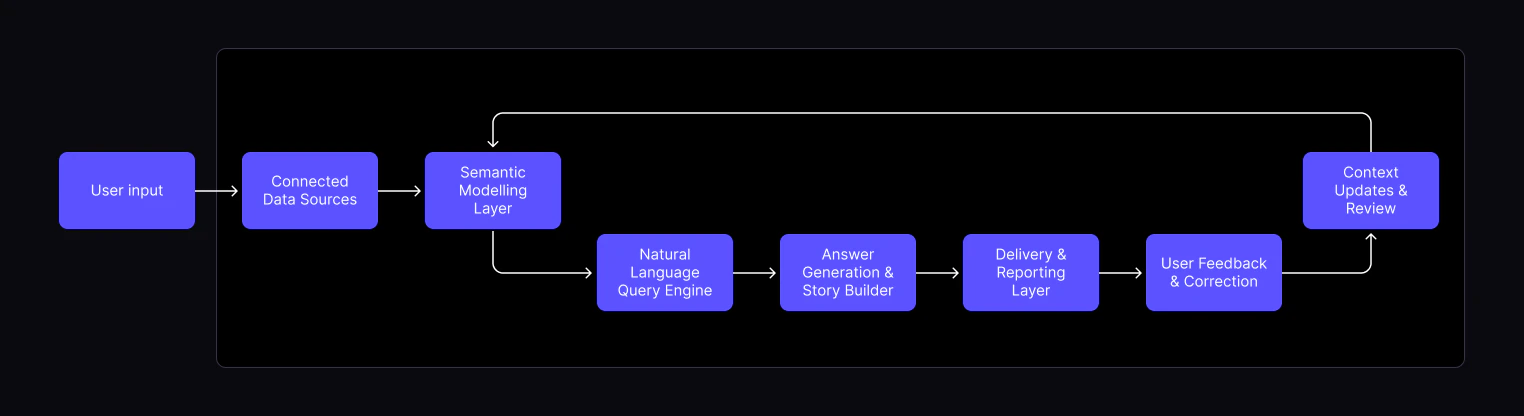
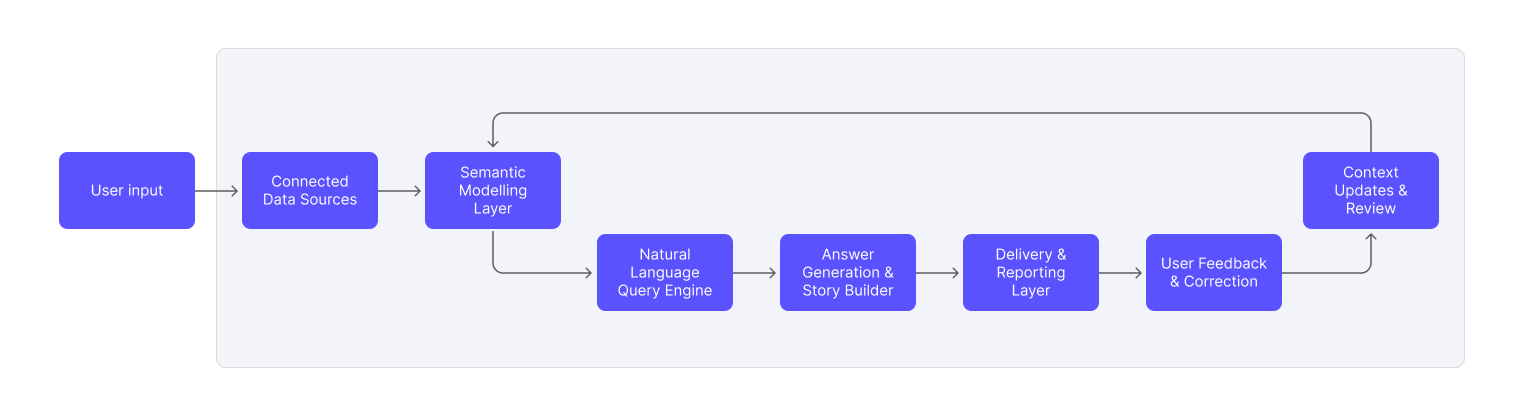 WisdomAI integrates with your data platforms (such as Snowflake, BigQuery, or Redshift), serving as the entry point for all information flowing through the system.
Admins and data owners enrich the data by documenting tables, columns, and domains. They also define relationships (e.g., one-to-many, many-to-many) to create a business-friendly context for natural language understanding.
Users ask questions in plain language. The NLQ engine parses these questions and translates them into SQL queries using the underlying semantic model.
Responses are generated and formatted into interactive Dashboards — data-driven narratives that combine visualizations, text, and insights. These can be scheduled and shared.
Dashboards and answers can be delivered via email or embedded into external applications, helping teams stay informed with minimal effort.
Users can give feedback on dashboard accuracy, suggest corrections, or add clarifying context to improve future results.
Admins and Data Admins review user feedback and update the semantic layer accordingly, closing the loop and continuously improving answer quality and domain understanding.
## Next steps
Explore the full list of databases and platforms you can connect to the system.
Walk through the initial setup to connect a data source and run your first query.
Define relationships and context in your data to enable more powerful analysis.
Help improve model accuracy by rating answers and providing corrections.
Compile key insights and visualizations into a shareable, narrative-driven report.
WisdomAI integrates with your data platforms (such as Snowflake, BigQuery, or Redshift), serving as the entry point for all information flowing through the system.
Admins and data owners enrich the data by documenting tables, columns, and domains. They also define relationships (e.g., one-to-many, many-to-many) to create a business-friendly context for natural language understanding.
Users ask questions in plain language. The NLQ engine parses these questions and translates them into SQL queries using the underlying semantic model.
Responses are generated and formatted into interactive Dashboards — data-driven narratives that combine visualizations, text, and insights. These can be scheduled and shared.
Dashboards and answers can be delivered via email or embedded into external applications, helping teams stay informed with minimal effort.
Users can give feedback on dashboard accuracy, suggest corrections, or add clarifying context to improve future results.
Admins and Data Admins review user feedback and update the semantic layer accordingly, closing the loop and continuously improving answer quality and domain understanding.
## Next steps
Explore the full list of databases and platforms you can connect to the system.
Walk through the initial setup to connect a data source and run your first query.
Define relationships and context in your data to enable more powerful analysis.
Help improve model accuracy by rating answers and providing corrections.
Compile key insights and visualizations into a shareable, narrative-driven report.